No robot vacuum sold in Australia climbs an actual staircase. That’s true today, and the CES videos doing the rounds of ones that supposedly can won’t change it before you need your floors cleaned this week. This guide is about what you can actually do with a two-storey house right now, not what a manufacturer is promising for later.
Don’t
The Roborock Saros Rover isn’t sold in Australia yet, and there’s no confirmed date. Buy for the house you have.
Pick it by floor type
Any modern robot can be carried between levels. What matters is how it handles the floors on each one, not the stairs between them.
iRobot Roomba 115 Combo
Buy a second cheap unit for the other floor rather than one expensive one plus an uncertain spare dock.
Why this one →
Walk into most robot vacuum guides and you’ll find a paragraph near the top telling you these things can’t climb stairs, followed by nothing useful about what to do instead. That’s the gap this guide fills. If your house has an upstairs, here’s the actual decision in front of you.
Not sure which one fits your home?
4 quick questions, then only the robots that fit.
Why nothing on the market climbs actual stairs
Roborock showed the Saros Rover at CES 2026 with a wheel-leg design built to walk up steps rather than roll over them. It got a lot of tech-press coverage in January, and it is still not listed for sale on Amazon Australia as of this month. We checked again while writing this guide and found nothing. Searching for it turns up spare parts and accessories for the current Saros line-up, not the machine itself.
CES demos routinely take six to twelve months to reach retail, sometimes longer, sometimes never in an Australian-specific version at all. Neither company has given a local release date. If you’re holding off buying anything until a robot that climbs stairs shows up, you could be waiting a while, and you’ll have dusty floors the whole time.
A wheel-leg chassis that can step up a kerb or a single stair tread in a demo video is a different engineering problem to a robot that autonomously climbs a full staircase, finds its way back down, and does it safely with a pet or a toddler in the house. Nobody has shipped that yet, anywhere.
Yes, you can carry a robot vacuum upstairs
This trips people up more than it should. You don’t need a special model to move a robot vacuum between floors. Every one of them is light enough to carry in one hand, and none of them mind being picked up mid-clean or moved around.
The part people worry about is mapping: will it get confused finding its way around a floor it hasn’t seen in a week? For any robot with laser mapping, no. iRobot’s own specifications for the Roomba 115 Combo, the simplest robot in our range, state it scans and stores up to 3 maps, even on different levels of your home. That’s the entry-level model, not a premium feature. Roborock and Xiaomi’s current ranges do the same thing. The robot switches to the right saved map for whichever floor you’ve put it on, so mapping isn’t the obstacle it used to be.
The dock is the actual problem
Here’s what nobody tells you: the robot is portable, but its dock usually isn’t. A self-empty dock is a fixed appliance, plugged into a powerpoint, often with a water tank if it also washes mops. Move the robot upstairs without moving the dock, and it’ll finish its clean and just sit there. It can’t empty its bin, can’t recharge, and won’t drive back downstairs to find you.
So there are really only two ways to run one robot across two floors, and one option to sidestep the problem entirely.
Carry the robot back to its one dock, every time. This costs nothing extra. It also means the robot can’t run on a schedule while you’re out. It’ll clean upstairs and then wait there until someone brings it down to charge and empty. Fine for an occasional upstairs clean. Not what you’re picturing when you imagine a robot vacuum “handling it”.
Buy a second dock for the other floor, if your model sells one. Some manufacturers sell a compatible replacement or spare dock separately; some don’t, and it’s not something we can promise across every product in our range without checking the specific listing. If full automation on both floors matters to you, confirm a spare dock actually exists for the model you’re looking at before you buy it expecting one.
If neither of those appeals, there’s a third option that sidesteps the dock problem completely: don’t share one robot between floors at all.
Buy two instead
Two inexpensive robots, one parked on each floor with its own dock, is often the least fiddly way to automate a two-storey house. You’re not carrying anything, you’re not chasing down a spare dock that might not exist, and each robot just runs its own schedule on its own level. It’s frequently cheaper than one flagship model plus a second dock, and it’s the option most likely to actually stay automated rather than becoming a chore you do “when I remember”.
The trade-off is obvious: you’re paying for two robots. If your budget only stretches to one, the carry-it-yourself option above costs nothing beyond the robot you were buying anyway.
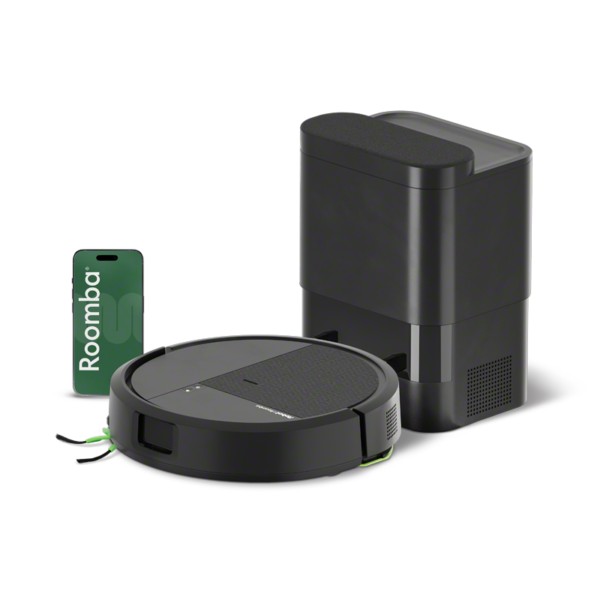
This is the entry point into a Roomba that empties itself, and iRobot’s own specifications confirm it stores maps for different levels rather than just different rooms. Buy it once for downstairs and once for upstairs and you’ve automated the whole house for less than most single flagship models cost on their own.
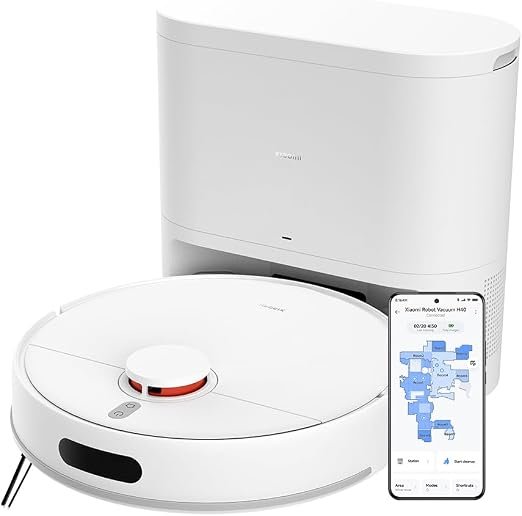
No mop, which is exactly the point if one or both floors are mostly carpet, or you’d rather mop by hand than manage a water tank on two separate robots. It maps with the same spinning laser scanner as the premium models, just without the extras. Straightforward, and one less thing to go wrong upstairs where you’re less likely to notice a problem straight away.
If you’d rather buy one for the whole house
That’s a reasonable call, especially if you’re only running it a few times a week and don’t mind carrying it back to its dock. In that case, the stairs aren’t really the decision: your floors are. A robot that handles tile, timber and carpet well on the ground floor will do exactly the same job upstairs; nothing about a level change makes a robot better or worse at mopping floorboards or climbing a door threshold.
Our floor-type guide covers that decision properly, including which machines clear door thresholds within a floor. Pick from there, then apply everything above about carrying it and its dock.
Questions people actually ask
Do any robot vacuums climb stairs?
No, not yet, not sold in Australia. The Roborock Saros Rover was shown at CES 2026 with a wheel-leg design built for steps, but it is not listed for sale on Amazon Australia and Roborock has not given a local release date.
What is the best robot vacuum for a two-storey house?
For most two-storey (2 story) homes, two inexpensive robots, one parked on each floor with its own dock. That is the buy two instead pick, the iRobot Roomba 115 Combo, which iRobot’s specifications say stores maps for different levels. If you only want one robot, choose it for your floors and carry it between levels; this section covers that.
Can I use one robot vacuum on two floors?
Yes. Any robot vacuum is light enough to carry between levels, and models with laser mapping (including entry-level ones) store separate maps for each floor. The catch isn’t the robot, it’s the dock: without one on each level, you’ll need to carry it back down yourself to charge and empty.
Do I need a charging dock on every floor?
Only if you want it to run automatically on both levels without you carrying it back and forth. Some manufacturers sell a spare or replacement dock separately; not all do. Check the specific model before assuming one is available.
Is it cheaper to buy two robots or one expensive one?
Often two inexpensive robots, one per floor, costs less than a single flagship model, and it sidesteps the spare-dock question entirely. If your budget only stretches to one robot, carrying it between floors costs nothing extra.
Will carrying a robot vacuum up and down stairs damage it?
No. Pick it up by the body, not the dust bin release or any flap, and set it down rather than dropping it. Otherwise there’s nothing about being carried that a robot vacuum isn’t built for.
What about the mop? Do I need to empty the water tank before carrying it?
Not for the vacuum itself, but if you’re moving it between a mopping run on one floor and straight onto carpet on another, let it finish drying at its dock first. Carrying it mid-mop risks dripping on the stairs.
Related guides
Shopping in the sales? Our Black Friday robot vacuum guide shows which deals are worth it, which to skip, and the warranty behind each pick.
For the floor-by-floor decision once you know whether you’re buying one robot or two, see our carpet, tiles and floorboards guide and our best robot vacuum guide. Our navigation explainer covers how laser mapping and multi-floor maps actually work under the bonnet. You can also browse the full robot vacuum range. Upstairs windows are the other job a two-storey house makes awkward, and our window cleaning robot guide covers which robots can do the outside of upstairs glass.
New buying guides and robot news, whenever there’s something worth telling you about.
No spam. Unsubscribe anytime.
ServiceBot earns a commission if you buy through the Amazon links on this page, at no extra cost to you. That is how we keep guides like this free and independently written.
This guide is built from each manufacturer’s own published specifications and their current Australian listings, checked in September 2026. Where a spare dock’s availability isn’t confirmed for a specific model, we say that instead of assuming one exists. We do not publish prices or customer ratings; check the current price on the retailer’s own listing before buying.
Last updated September 2026.

3 Responses